
Online Inventory Management Software – V2 – PHP

Online Inventory Management Software will help you to manage your product stock in a manageable way. This system is a second version and more advance than the previous one. This system is built on CodeIgniter with proper management of users, groups, brands, stores, products, orders, and reports. You can create as many users as you want and assign them to the required modules. The system features are listed below section. In addition, We will also teach you how to install the system successfully.

This system can be also used for small businesses. It is free web-based inventory management software. This system is based on the store inventory system. The products are controlled by the store.

System Features

  • Admin
  • email: admin@admin.com
  • password: password

System Features

  • Manage Users
    • Add new user detail
    • View, Update, and remove user information
  • Manage Groups
    • Add new group information
    • View, Update, and remove group information
  • Manage Brands
    • Add new brand data
    • View, Update, and remove brand information
  • Manage Category
    • Add new category information
    • View, Update, and remove category information
  • Manage Stores
    • Add new store information
    • View, Update, and remove stores information
  • Manage Attributes
    • Add new attribute information
    • View, Update, and remove attributes information
  • Manage Products
    • Add new product information
    • View, Update, and remove products information
  • Manage Orders
    • Add new order information
    • View, Update, and remove orders information
  • Reports
    • View the total amount of sales represented on the graphical chart based on yearly.
  • Company
    • Update the company information
    • That includes company name, address, phone, message, vat charge, service charge, and more..
  • Profile
    • View the logged in user information
  • Setting
    • View, and Update logged-in user information

Installation guidelines

First, download the source code and database from the link below section. Please download them it’s free to download.

After you have downloaded the source code. If you don’t have MySQL or XAMPP (Windows), or MAMP (MacOS) on your operating system then please download them.

Now, create the database named as a stock, and import the database file.
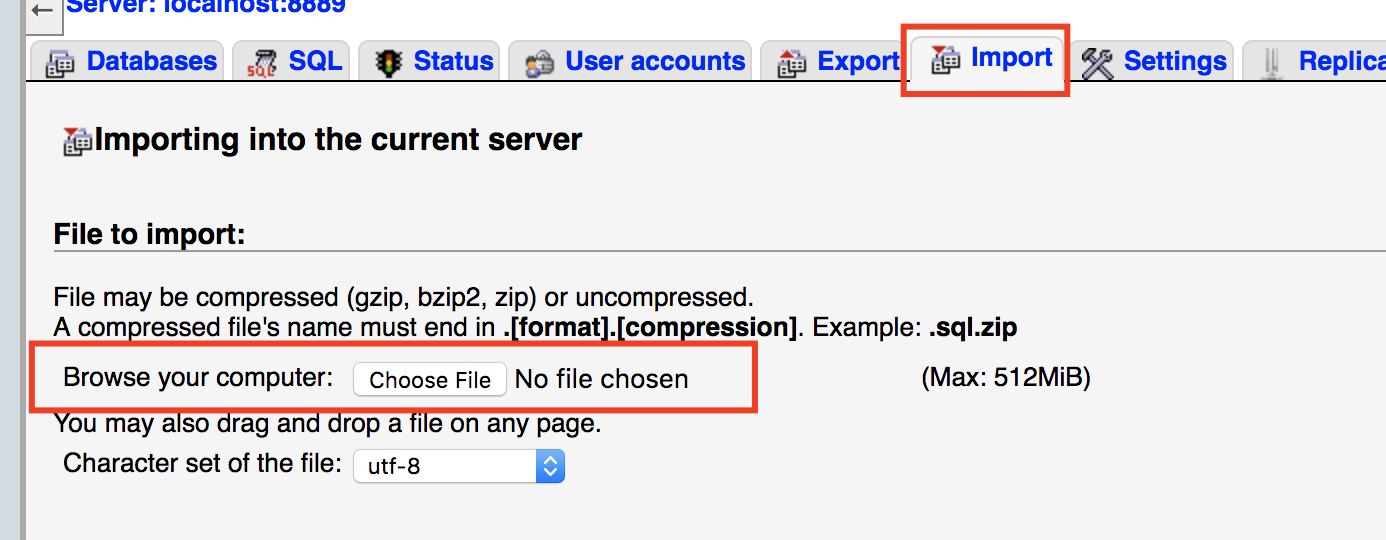
So If your database is installed successfully copy the downloaded source code into the htdocs file which is located in MAMP or XAMPP directory.

After you have copied the file into that folder go to the stock/application/config/config.php. There you will see site_url which is a global array. Change that localhost:8888 into your suitable port no. For example, if you have localhost:8080 then changed it to that port no.
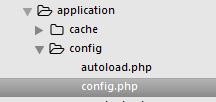

$config['base_url'] = 'http://localhost:8888/stock';

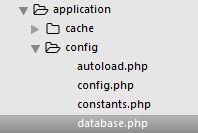
Go to the applications >> config >> database.php file and check if the created database name matches. As well as, If you have a different database user username and password on your system then you will need to change the username and password.
folder_structur


$db['default'] = array(
	'dsn'	=> '',
	'hostname' => 'localhost',
	'username' => 'root',
	'password' => 'root',
	'database' => 'stock',
	'dbdriver' => 'mysqli',
	'dbprefix' => '',
	'pconnect' => FALSE,
	'db_debug' => (ENVIRONMENT !== 'production'),
	'cache_on' => FALSE,
	'cachedir' => '',
	'char_set' => 'utf8',
	'dbcollat' => 'utf8_general_ci',
	'swap_pre' => '',
	'encrypt' => FALSE,
	'compress' => FALSE,
	'stricton' => FALSE,
	'failover' => array(),
	'save_queries' => TRUE
);

This is the final step. After you have successfully installed and configured the main file. Open the Chrome browser and type localhost:8888 or any port no that your Apache server provided. After that, the page should redirect you to the login page. Please enter the credential that has been provided in the above page section.

I hope this helps you a lot. Thank you

CHANGELOG

1.1>
* Fixed the session issue
* Fixed the empty string core/Output.php
* Fixed the setCookie() deprecated issue.
* Fixed the order section.

System Live Preview

Live Preview

Download Source Code:

Download

System Features

Installation guidelines

Parking Management System – Codeigniter

The parking Management System is the most complete and versatile parking management system. This system is an open-source project. We have provided the most advanced backend management functionality with parking slots, parking rates, parking categories, and more of the best functionality.

Parking Management System is an open-source project for people who wants to grab the core idea of the data process within the system. This system is built on CodeIgniter – PHP framework, adminlte, bootstrap, javascript, jQuery, and Ajax. This system, Parking Management System, is based on the Web Application. It provides advanced functionality and runs daily basic requirements for the parking system. Many users can manage work with the system based on their user permission.

The admin can create as many users as he wants based on the user’s permission. The permission is set up in the group section. The super admin can create the group with limited functionality. Please have a look at the video which will make
the concept more clear to you.

In this application, there are a lot of dependencies that you will have to understand. For instance, to create the parking information, you must have the parking category, rates, and slot information on the system. Without them the parking information is incomplete.

Please follow each and every step to run this system on your system. You will need to make a few changes to the code to run this application our your design. I hope you have installed XAMPP (windows), and MAMP (MACOS) on your system.

The source code and the database are provided at the end of the tutorial. Please download them and follow each and every step to successfully install and run the system.

Users

  • Admin
  • Email: admin@admin.com
  • password: password

Features

  • Manage User

    • Add new user detail
    • View, Update, and remove user information
  • Manage Groups

    • Add new group information
    • View, Update, and remove group information
  • Manage Category

    • Add category information
    • View, Update, and remove category information
  • Manage Rates

    • Add rate information
    • View, Update, and remove rate information
  • Manage Slot

    • Add slot information
    • View, Update, and remove slot information
  • Manage Parking

    • Add parking information
    • View, Update, and remove parking information
    • Update the slot availability
  • Reports

    • View the paid parking information based on the yearly
  • Manage Company information

    • Update the company information
  • View Profile information

    • View user profile information
  • Manage Setting

    • Update user information
    • Update password information

Requirements

  • PHP Version +7.0.0
  • Web Server ( Recommended: Apache with PHP and Mysqli )

Installing source code and database guidelines

Step 1: Download the database and source.

Step 2: Change port no.

Go to the application > config > config.php as shown below.

config

After that go to base_url, and update or remove the port no based on your system configuration:

[css autolinks=”false” classname=”myclass” collapse=”false” firstline=”1″ gutter=”true” highlight=”” htmlscript=”false” light=”false” padlinenumbers=”false” smarttabs=”true” tabsize=”4″ toolbar=”true” title=””]
$config[‘base_url’] = ‘http://localhost:8888/parking’;
[/css]

Step 3: Create the database and import the SQL

Go to http://localhost:8888/phpmyadmin, and click on the database section. There create the database name as “parking”.

After that click on the created database and import the database file which has been provided.

Now, Go to the application > config > Database.php file.

folder_structur

In this file there are 3 things to update. They are username, password, and database.

username: Change username based on database user’s username
password: Change password based on database user’s password
database: Change database name if you different database name


$db['default'] = array(
   'dsn'	=> '',
   'hostname' => 'localhost',
   'username' => 'root',
   'password' => 'root',
   'database' => 'parking',
   'dbdriver' => 'mysqli',
   'dbprefix' => '',
   'pconnect' => FALSE,
   'db_debug' => (ENVIRONMENT !== 'production'),
   'cache_on' => FALSE,
   'cachedir' => '',
   'char_set' => 'utf8',
   'dbcollat' => 'utf8_general_ci',
   'swap_pre' => '',
   'encrypt' => FALSE,
   'compress' => FALSE,
   'stricton' => FALSE,
   'failover' => array(),
   'save_queries' => TRUE
);

If this project really helped you guys, then please comment, and share. Thank you.

CHANGELOG

1.1>
* Fixed the session issue
* Fixed the empty string core/Output.php
* Fixed the setCookie() deprecated issue.

System Live Preview

Live Preview

For Source Code:

Download